Answer product questions in hours, not weeks.

Know if users are actually using your product. Collect product events with a single HTTP request. No SDKs, no database schema changes, no analytics setup marathon.

POST https://api.sedl.dev/public/create_event

{
  "typeId": "0d2297b0-e3e6-40da-9752-f790ba51bfc6",
  "payload": {
    "userId": "yourFirstCustomerId"
  },
  "loggingToken": "39e05213-e7b6-4d65-836a-58fd55ae85fb"
}

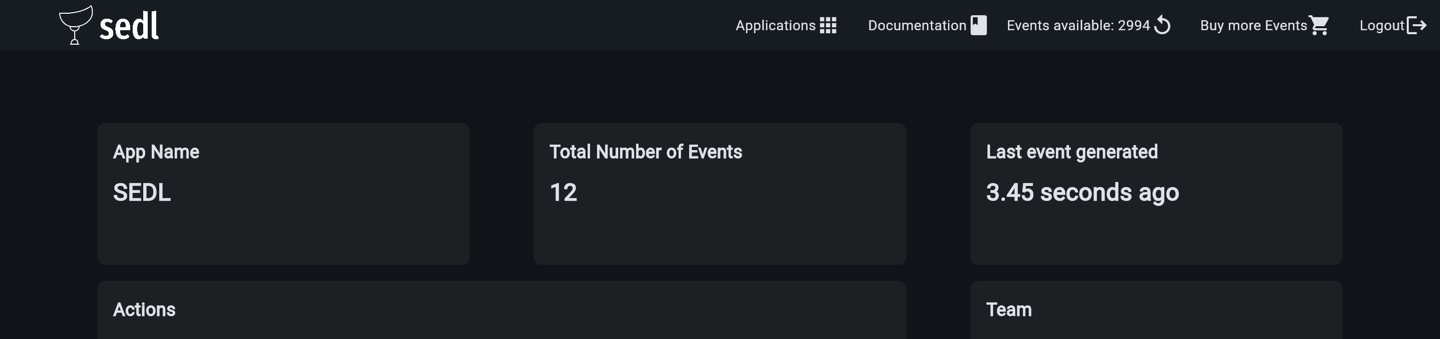
That's it. Your event is now available in the dashboard.
sedl app image shape shape
How It Works

From zero to production insights in four steps

Understand the complete flow in less than 10 seconds.

1

Create a Project

Sign up and create a project for your app in seconds.

2

Create an Event Type

Define the events you want to track, like signup_completed.

3

Send an HTTP Request

One simple POST from anywhere in your code. No SDK required.

4

View Insights in the Dashboard

Your events show up instantly, ready to answer your questions.

Features

Product insights without analytics complexity

SEDL was built for teams that need answers, not another complex tool to manage.

No SDK

No SDK needed to integrate with your app. If you have internet you can use SEDL.

Start Tracking

Access analytics data

SEDL provides you with access to your analytics data.

Start Tracking

Download raw events

Have access to your raw events.

Start Tracking

Fast Implementation

Go from zero to production tracking in hours, not weeks. Just send a request.

Start Tracking
Why SEDL?

Stop spending days setting up analytics

Most small teams do not need a complex analytics platform. They simply need answers about how users interact with their product.

Without SEDL

  • Create analytics tables
  • Create migrations
  • Create endpoints
  • Create dashboards
  • Deploy
  • Wait for data

With SEDL

  • Create event
  • Send HTTP request
  • View dashboard
Insights

Questions SEDL Helps Answer

Get clarity on your product performance without the complexity.

Feature Usage

Are users actually using my new feature?

Drop-offs

Where do users abandon the signup flow?

Popularity

Which pages are the most visited this week?

Dead weight

Which actions are never used by my customers?

Release Impact

What changed after the last release?

Engagement

Which pages generate the most engagement?

SEDL is for:

  • Small SaaS teams
  • MVPs & Side projects
  • Startups
  • Agencies & Consultants
  • Teams without dedicated data engineers

SEDL is NOT for:

  • Big Data workloads
  • Enterprise analytics departments
  • Billions of monthly events
  • Complex BI use cases
shape
How does it work?

Learn the four steps needed to use SEDL

1. Create an account
Press the login button and register for an account with you email. You will be redirected to the SEDL
3. Create an event type
Create an event type for each event you want to track. Event types help you categorize and organize your analytics data.
2. Create an app
Create an app that you would like to track. Each app has a unique logging token, used to track events.
4. Add tracking to your code
Send a simple HTTP request with your app token and event name. That's it. Your event is now available in the dashboard.
Who is Satisfied With Us

Get to know some of the companies that are already generating events with SEDL

Already used in production by
Real Case

Why we built SEDL

"We built SEDL while working on client projects where simple questions like 'Are users using this feature?' required days of analytics implementation. Instead of creating analytics tables, migrations, dashboards, and integrations every time, we created a simple event collection platform that could be deployed in production the same day."

Gabriel Oliveira

Founder of SEDL

SEDL Dashboard
CONTACT US

Let’s talk
Love to hear from you!

Our Location

Brasília, Brasil

How Can We Help?

+55 61 999 399 212

Send us a Message